The 6 Best LinkedIn Email Finder Tools in 2026
You found the right person on LinkedIn — now you need their verified work email without getting your account restricted. We ranked the six leading email finders on match rate, cost per found email, and account safety.
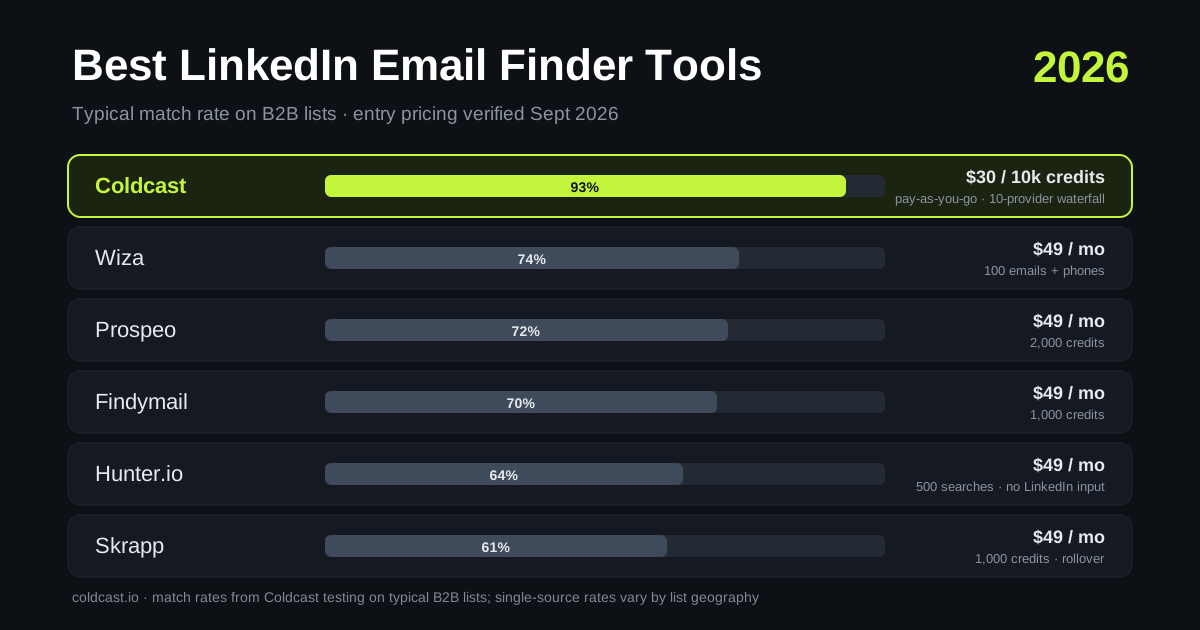
The six best LinkedIn email finders, tested
You found the right person on LinkedIn. Now you need their work email — verified, deliverable, and without putting your LinkedIn account at risk to get it.
That last part matters more than most roundups admit. Plenty of “email finders” are really browser automations that hammer LinkedIn from your session until you get restricted. The best tools in 2026 separate the two jobs: extract the profile safely, then find the email by querying data providers — never LinkedIn itself.
We tested the leading options on three things: match rate (how often a valid email comes back), cost per found email (not cost per credit — a credit spent on “not found” is money burned), and account safety (whether the tool’s scraping behavior can get your LinkedIn or Sales Navigator account flagged). Here’s how the six best stack up.
Quick comparison
| Tool | Starting price | Free tier | Email source | Charged for “not found”? |
|---|---|---|---|---|
| Coldcast | Pay-as-you-go ($30 per 10k enrichment credits) | 100 leads + 50 enrichments | 10-provider waterfall | No |
| Wiza | $49/mo (100 emails) | 20 emails/mo | Own database + real-time | No (valid emails only) |
| Prospeo | $49/mo (2,000 credits) | 100 credits/mo | Own engine | No |
| Findymail | $49/mo (1,000 credits) | 10-credit trial | Own engine + verification | No |
| Hunter.io | $49/mo (500 searches) | 25 searches/mo | Public web crawl | Search consumes quota |
| Skrapp | $49/mo (1,000 credits) | 50 credits/mo | Own database | No (valid/catch-all only) |
Pricing verified September 2026. Most tools cluster at $49/month entry — the real differences are match rate, credit expiry, and how each tool gets profile data out of LinkedIn.
1. Coldcast — best overall for Sales Navigator prospecting
Coldcast treats email finding as the second half of a pipeline that starts with safe extraction. The Sales Navigator scraper pulls your lead lists with human-paced requests, daily caps, and an isolated cloud browser — then the waterfall enricher queries up to 10 data providers in sequence until one returns a valid email.
That waterfall architecture is the headline. A single-source finder is capped by its own database; if the provider doesn’t have your prospect, you get nothing. Cascading across 10 providers pushes Coldcast’s match rate to 90–95% on typical B2B lists — roughly 20–30 points above what any single provider manages alone. Every hit then passes syntax, MX, SMTP, and catch-all checks via built-in verification before it reaches your CSV.
Pricing is pay-as-you-go rather than a subscription: $30 per 10,000 enrichment credits, and you’re only charged when an email is actually found. Credits never expire — no “use it or lose it” pressure, which makes Coldcast unusually good for teams with lumpy prospecting volume.
Honest caveats: Coldcast is built around scraping-plus-enrichment workflows (Sales Navigator, Apollo, ZoomInfo). If you only want a one-at-a-time Chrome extension lookup while browsing profiles, a lighter tool may feel simpler. There’s no phone number data on the base waterfall either.
Best for: SDRs and agencies exporting Sales Navigator lists who want the highest match rate per dollar without risking their LinkedIn account.
2. Wiza — best for phone numbers alongside emails
Wiza is a well-established Sales Navigator export tool with real-time email finding and solid phone number coverage. Plans run from $49/month (100 emails + 100 phone credits) up to “unlimited” tiers at $83–$166/month billed annually — with fair-use caps around 10,000 exports/month, so unlimited isn’t literally unlimited.
Caveats: unused credits expire monthly, and Wiza’s extraction runs through your LinkedIn session via its extension — pace your exports. If Wiza’s pricing model doesn’t fit, see our full Wiza alternative breakdown.
Best for: teams that need mobile numbers as much as emails.
3. Prospeo — best single-engine finder for Sales Navigator
Prospeo earns its reputation on strong Sales Navigator support and a clean credit model: $49/month for 2,000 credits up to $249/month for 15,000, with only found emails consuming credits. The free tier (100 credits/month) is fine for testing but caps exports at 25 rows per pull.
Caveats: it’s still one engine. When Prospeo’s sources miss, there’s no fallback provider — which is exactly the gap waterfall tools close. Comparison here: Prospeo alternative.
Best for: solo founders who want a simple, predictable subscription.
4. Findymail — best for outbound agencies on Apollo data
Findymail pairs email finding with automatic verification and strong integrations (Clay, Smartlead, HubSpot). Plans: $49/month for 1,000 credits, $99 for 5,000, $249 for 15,000; every plan includes API access. Phone numbers cost 10 credits each.
Caveats: the trial is tiny (10 credits), and like Prospeo it’s a single engine — agencies often run Findymail inside a waterfall rather than as the waterfall.
Best for: agencies that want verified-by-default emails plugged into their sending stack.
5. Hunter.io — best for domain-wide email discovery
Hunter is the veteran here, built on a massive crawl of the public web. It excels at domain search (“everyone @acme.com”) and pattern inference. Plans start at $49/month for 500 searches; the free tier gives 25 searches/month.
Caveats: Hunter has no native LinkedIn integration — you’re pasting names and domains, not enriching LinkedIn URLs. Searches consume quota whether or not a personal email is found, and coverage skews toward people who appear on public web pages.
Best for: content and PR outreach where you’re targeting domains, not LinkedIn profiles.
6. Skrapp — best budget rollover credits
Skrapp offers a LinkedIn extension plus bulk finder at $49/month for 1,000 credits, scaling to 50,000 credits at $299/month. Two things stand out: credits roll over month to month, and you’re only charged for valid or catch-all results.
Caveats: match rates trail the leaders on non-US data in our testing, and the extension operates in your LinkedIn session — use conservative daily volumes.
Best for: budget-conscious teams with irregular prospecting cycles.
Why waterfall enrichment wins on match rate
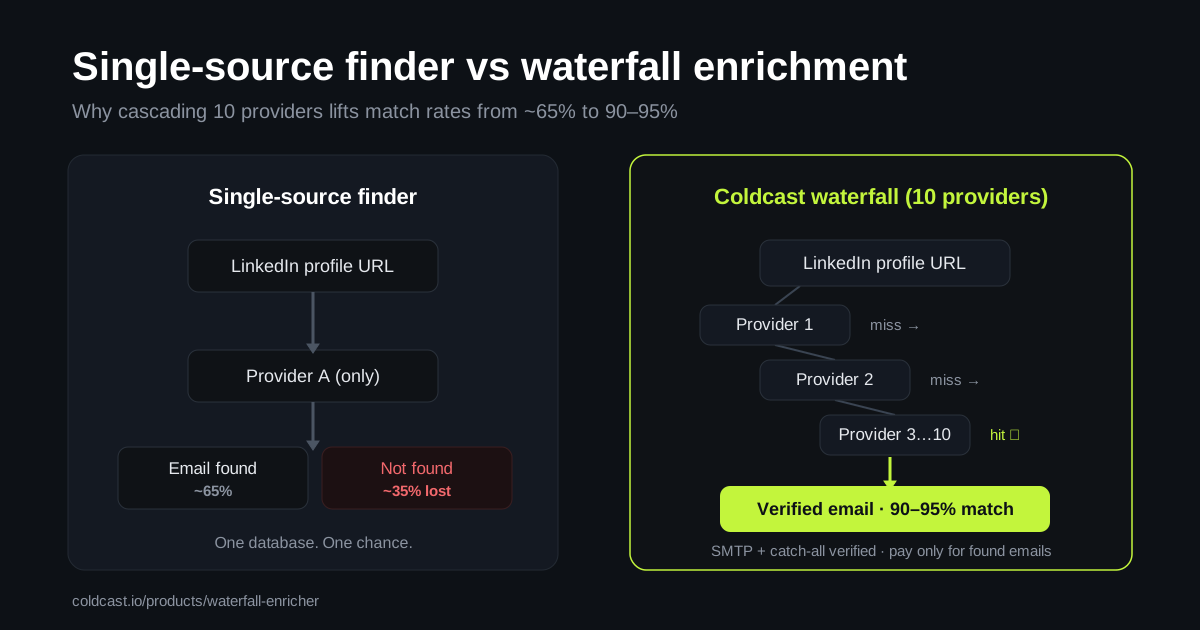
Every email finder ultimately answers one question: is this person in a database I can reach? A single-source tool asks once. A waterfall enricher asks ten times, in cost order, stopping at the first verified hit.
The math compounds fast. If each provider independently finds ~60–70% of contacts, cascading across providers lifts the combined match rate into the 90s — and because you only pay for found emails, the extra coverage doesn’t cost extra. That’s why Clay-style waterfalls became the agency standard, and why Coldcast builds the waterfall in natively instead of making you stitch providers together.
How to choose
Match the tool to your workflow, not the other way around. If your leads live in Sales Navigator lists, pick a tool that exports them safely and enriches in bulk — Coldcast or Prospeo. If you need phone numbers, Wiza. If you’re doing domain-based PR outreach, Hunter. If you’re an agency with a sending stack, Findymail. And whatever you choose, verify before you send — a 90% match rate means nothing if bounces torch your sender reputation. (Full guide: how to get emails from LinkedIn Sales Navigator.)
Frequently asked questions
What is the most accurate LinkedIn email finder?
Waterfall-based tools are the most accurate as a category, because they combine multiple data providers instead of relying on one database. Coldcast’s 10-provider waterfall returns valid emails for 90–95% of typical B2B contacts, versus roughly 60–75% for single-source finders.
Are LinkedIn email finders safe for my LinkedIn account?
It depends on the architecture. Tools that automate heavy actions inside your LinkedIn session can trigger restrictions. Safer tools use human-paced extraction with daily caps — and crucially, they find emails from third-party data providers, never by hammering LinkedIn itself. Coldcast adds an isolated cloud browser so bulk work never touches your everyday browsing.
Do email finders charge for emails they can’t find?
The better ones don’t. Coldcast, Prospeo, Findymail, Wiza, and Skrapp only consume credits for found (or valid/catch-all) emails. Hunter’s searches consume quota regardless of result, which changes the effective cost per found email.
Can I find emails from LinkedIn for free?
Most tools offer small free tiers: Coldcast includes 100 free leads plus 50 enrichments, Prospeo gives 100 credits/month, Hunter 25 searches/month. Free tiers are for testing data quality — for real list-building you’ll need a paid tier or pay-as-you-go credits.
Is it legal to find someone’s work email from LinkedIn?
Finding and using publicly available business contact information for B2B outreach is generally lawful in most jurisdictions, provided you comply with applicable rules like GDPR (legitimate interest, easy opt-out) and CAN-SPAM. The email finding itself queries business databases, not LinkedIn’s private data.