How to Export Leads from LinkedIn Sales Navigator to Excel or CSV (2026)
LinkedIn gives you world-class search filters and then no export button. Here are the four ways teams actually get Sales Navigator leads into a spreadsheet — and how to do it without risking your account.
Sales Navigator has no export button — by design
Sales Navigator is the best B2B search engine on the planet: 45+ filters over roughly a billion profiles. But LinkedIn deliberately ships no "download CSV" button, because your lead lists are the product it wants to keep inside its walls. CRM sync exists only on the Advanced Plus tier and only writes to connected CRMs — there is still no spreadsheet export.
So every team that runs cold outreach from Sales Navigator ends up choosing one of four extraction methods. They differ enormously in speed, data quality and — most importantly — account risk. (If you're still building your search, start with our full Sales Navigator guide — a tight, in-ICP search is what makes any export worth having.)
What data can you actually export?
From the profiles in a search or lead list, extraction captures the fields LinkedIn renders: full name, current title, company, company URL and domain, location, profile URL, headcount range, industry, and tenure. Company-level (account) searches add firmographics: headcount, industry, growth signals and the company page data.
What is never on LinkedIn: reliable work emails and phone numbers. Those come from an enrichment step after extraction — Coldcast runs waterfall enrichment across multiple data providers during the export, then verifies every email in real time, so contact data arrives in the same file instead of requiring a second and third tool. The full email playbook is in how to get verified emails from Sales Navigator.
Know the limits before you export
- 2,500 results per search. Sales Navigator displays at most 100 pages of 25 results no matter how many profiles match. Slice bigger audiences by geography, headcount or industry into sub-2,500 segments and export each.
- Daily pace matters more than any hard number. Extraction speed should match an established account's normal behavior — Coldcast paces every action like a human session and supports up to 20,000 leads/day safely. New accounts should ramp up gradually.
- 25 lead lists of 1,000 is the cap on native lists — another reason exports beat trying to manage pipeline inside LinkedIn.
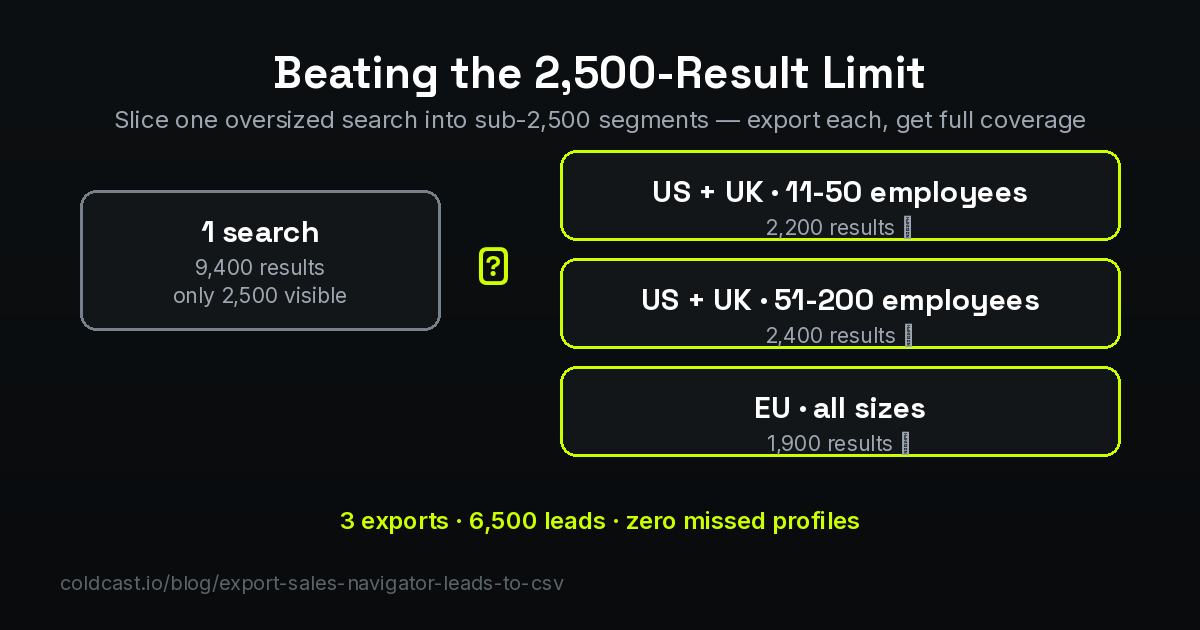
Slicing sounds tedious; it isn't. Pick one high-cardinality filter — headcount bands or regions work best — and duplicate the search once per band. Three to five segments cover almost any market, each lands under the cap, and the segment label itself becomes useful metadata in your CRM ("EU · 51-200" tells a rep the context before the first call).
Exporting account lists (companies), not just leads
Lead exports get the attention, but account exports run ABM. A Sales Navigator *account* search — filtered by headcount, industry, growth or funding Spotlights — exports the company-level view: name, domain, headcount, industry, and the firmographics enrichment adds. Two plays make it valuable: domain-first enrichment, where the exported domains feed domain enrichment to return technographics and verified decision-maker contacts per company; and the two-step ABM export — export accounts first, pick the best 100 by fit, then run a lead search filtered to those accounts and export the 2–4 buyers per company. You get a multithreaded contact map instead of a flat list.
Excel cleanup recipes for exported lists
Coldcast exports arrive clean (no "LinkedIn Member" rows, normalized names), but every workflow has its own last mile. The four recipes that cover most of it:
- Dedupe against your CRM: paste your CRM's email column on a second sheet, then flag matches with =IF(COUNTIF(Sheet2!A:A, C2)>0, "IN CRM", "NEW") and filter to NEW before importing.
- Split full names when a tool needs them separate: =TEXTBEFORE(A2, " ") and =TEXTAFTER(A2, " ") (or Data → Text to Columns on older Excel).
- Standardize company suffixes: =TRIM(SUBSTITUTE(SUBSTITUTE(B2, " Inc.", ""), " Ltd", "")) keeps "Acme" and "Acme Inc." from becoming two accounts.
- Build the suppression check into the sheet: a SUPPRESS tab with customer + competitor domains, then =IF(COUNTIF(SUPPRESS!A:A, TEXTAFTER(C2,"@"))>0, "SKIP", "OK") — nobody cold-emails a customer again.
Method 1: Copy-paste by hand
The zero-tooling option: open each search result, copy name, title, company and profile URL into a spreadsheet. It is completely safe and completely impractical — at 25 results per page, a 2,500-lead search means an hour of pasting per hundred leads, with typos, no emails and no phone numbers. Fine for a ten-lead ABM list; a non-starter for real volume.
Method 2: Generic scraping extensions
Dozens of Chrome extensions will pull whatever page you are looking at into a CSV. They are cheap, but most are generic scrapers with no LinkedIn-specific safety engineering: no pacing, no volume governance, and no data hygiene — you get raw scraped fields full of "LinkedIn Member" placeholders, emoji-decorated names and stale titles. The account bans they cause cost far more than the subscription they save.
Method 3: Credential-replay automation
These platforms authenticate the risky way: with your stored session cookie or password, replayed from their own infrastructure at machine speed. That creates a second, parallel session that impersonates you and fires bursts of automated activity LinkedIn does not recognize as human — the highest-risk architecture there is, as we cover in detail in our guide to scraping without getting banned.
Method 4: Account-safe session extraction (Coldcast)
The approach built for teams that need volume and need their accounts alive. Coldcast extracts search results using your own logged-in session at human pace with hard limits, then does everything heavy — enrichment, verification, scoring — outside LinkedIn:
- Step 1. Build your search in Sales Navigator with all your filters applied.
- Step 2. Paste the search URL into Coldcast (or use the extension) and start the export.
- Step 3. Extraction runs on your own logged-in session at human pace — no password, no cookie hand-over, no second session, up to 20,000 leads/day.
- Step 4. Each lead is cleaned (no "LinkedIn Member" rows, normalized names and companies) and enriched with waterfall enrichment across independent providers for emails and direct dials.
- Step 5. Every email is verified in real time — MX, SMTP and catch-all checks — before it reaches your file.
- Step 6. Download your CSV/Excel file, or push the list straight into your outreach stack.
The result is not a raw scrape but a send-ready list: verified emails, phones, firmographics and AI fit-scoring, with bounces filtered out before you ever hit send.
Getting the export into your CRM
A clean CSV drops into any CRM's import wizard — map name, title, company, email, phone and profile URL to your fields, and keep two habits: dedupe on import (match on email first, then profile URL) so re-exports never create duplicate records, and tag the import batch (source + date + search name) so you can measure which Sales Navigator searches actually produce pipeline. For sequencers like Instantly, Smartlead or Clay the same file works as-is — Coldcast's columns are named for direct mapping.
After the export: three habits that protect deliverability
- Verify before every send, not once. Emails decay ~2-3% a month; a list verified at export stays clean, a list exported months ago does not.
- Split searches over 2,500 results by region, headcount or industry — Sales Navigator caps what any search returns, and slicing gets you full coverage safely.
- Suppress before you sequence. De-dupe new exports against your CRM and past campaigns so the same prospect never gets two cold opens.
Frequently asked questions
Does LinkedIn Sales Navigator have a built-in export to Excel?
No. No Sales Navigator tier offers CSV or Excel export of lead lists. The Advanced Plus tier can sync data to connected CRMs, but there is no native spreadsheet download on any plan — third-party extraction is the only way to get leads into a file.
How many leads can I export from one Sales Navigator search?
Sales Navigator shows at most 2,500 results per search (100 pages of 25). To capture a larger audience, split the search into segments — by geography, company size or industry — that each return under 2,500, then export each segment.
Do exported leads include email addresses?
Not from LinkedIn itself — profiles rarely expose emails. Contact data comes from an enrichment step after extraction: Coldcast cascades multiple independent data providers (waterfall enrichment) and verifies every address in real time, so the file you download has deliverable emails rather than guesses.
Is it safe to export leads from Sales Navigator?
It depends entirely on the method. Extraction that runs your own logged-in session at human pace with hard limits is the safest architecture available; tools that replay your session cookie at machine speed are the riskiest. See our full guide on scraping Sales Navigator without getting banned.