How to Get Verified Emails from LinkedIn Sales Navigator (2026)
Sales Navigator gives you perfect targeting and zero email addresses. Here is the complete playbook: where emails hide on profiles, why manual hunting fails, how email finders actually work, and how waterfall enrichment gets verified addresses for most of your list.
Does Sales Navigator provide email addresses?
No — and it never will, because selling contact data would cannibalize LinkedIn's own products and violate the privacy expectations of its members. A profile shows an email only in one narrow case: the member typed one into their contact-info section *and* you are connected to them. In practice that surfaces mostly personal Gmail addresses for a small fraction of your first-degree network — useless for B2B outbound at any scale.
So every Sales Navigator workflow needs an email step bolted on after targeting. There are exactly two ways to do it: hunt manually, or enrich automatically. Let's be honest about both.
Where emails hide on a profile (and why manual hunting fails)
Manually, there are three places to look: the Contact info panel (connections only), the About section (some founders and sellers paste an email there — searching the profile for "@" finds it), and occasionally the banner image, where people embed contact details as pixels.
Why this doesn't scale:
- Hit rates are tiny — roughly a third of first-degree connections expose any email, and low single digits for everyone else.
- What you find is often personal — Gmail and Outlook addresses convert worse and look unprofessional for B2B outreach.
- It's stale — people set contact info once and never update it; job changes make it wrong.
- It's unverified — a typed-in email tells you nothing about whether the mailbox still accepts mail; bounces poison your sender reputation.
- It's hours of clicking — 30 seconds per profile times 2,000 leads is a work week.
How email finders actually work
Email finding tools combine three techniques. Database lookup: providers maintain hundreds of millions of previously-verified work emails, keyed to people and companies. Pattern matching: most companies use one format — first.last@, f.last@, first@ — so from a name plus the company domain, a finder generates candidates and tests them. Live verification: candidates are checked against the mail server (MX and SMTP checks) to confirm the mailbox exists before you ever send.
The critical thing to understand: every provider has blind spots. Each database skews toward certain regions, industries and seniority levels. A finder that is excellent on US tech VPs may be poor on German manufacturing managers. That single fact explains the biggest lever in this whole topic — waterfall enrichment.
The bulk answer: waterfall enrichment
Waterfall enrichment queries multiple providers in sequence: if provider 1 misses, ask provider 2, then 3, until a verified email comes back. Because providers' blind spots don't overlap much, cascading them typically yields 30–50% more verified emails than any single source on the same list.
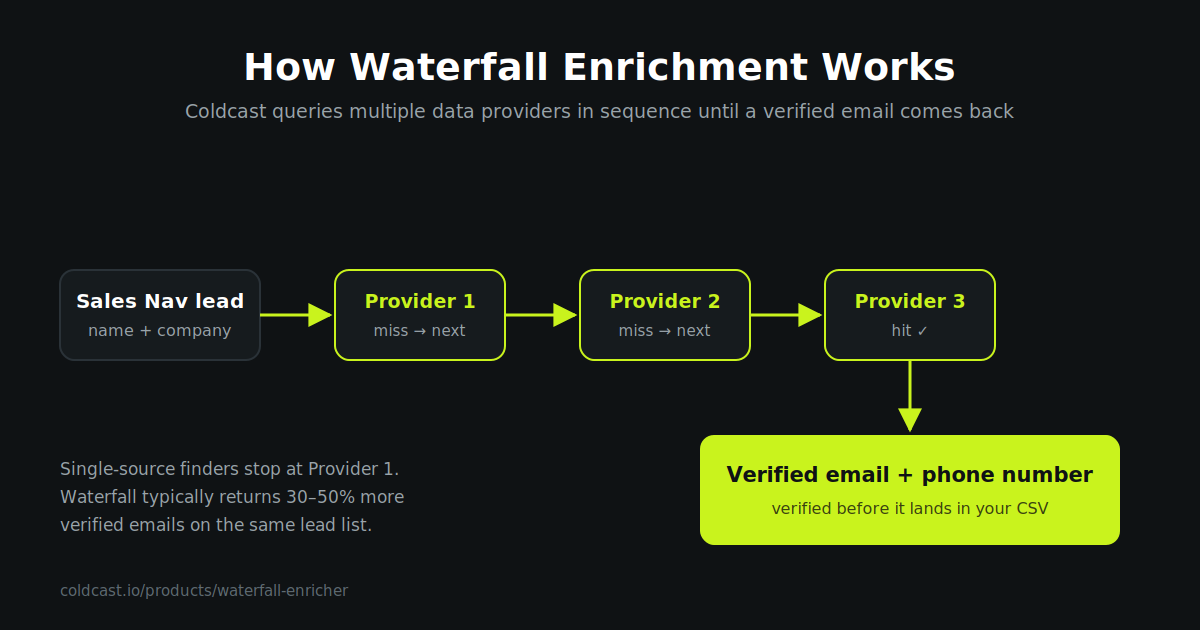
This is how Coldcast handles emails end-to-end: paste a Sales Navigator search URL, extraction runs safely on your own logged-in session at human pace, and every lead cascades through waterfall enrichment — multiple independent providers plus pattern testing — with each hit verified in real time before it lands in your CSV. One pass, one file, no spreadsheet-merging between four tools. You pay only for valid hits, not for misses.
Verification: safe, catch-all, and unfound
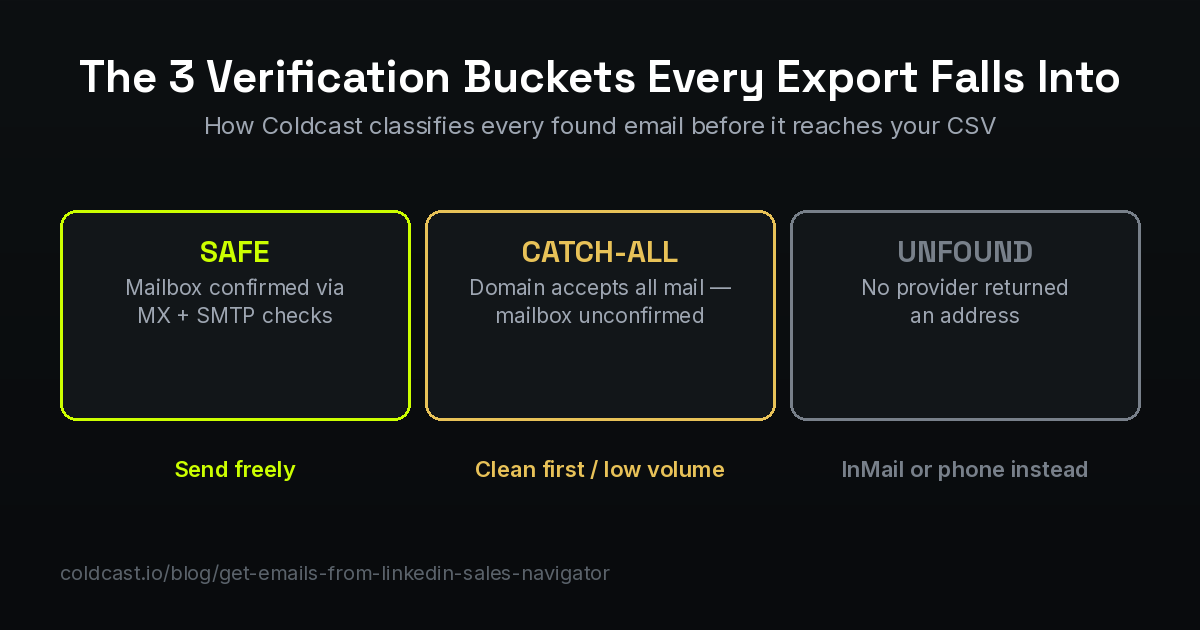
Every found email lands in one of three buckets, and treating them the same is how sender reputations die:
- Safe / deliverable — the mail server confirmed this exact mailbox exists. Send freely.
- Risky / catch-all — the domain accepts mail for *any* address, so the specific mailbox can't be confirmed. Some are real, some are black holes. Send from a separate warmed inbox, in smaller volumes, or run them through a catch-all cleaning step first.
- Unfound — no provider returned an address. Don't guess: switch channels instead (see below).
Also remember decay: B2B emails go stale at roughly 2–3% per month as people change jobs. A list enriched in January is measurably worse by June — verify at send time, not just at export time.
Choosing an email finder: the checklist that matters
Every tool's landing page claims the best hit rate. Ignore the claims and compare on structure:
| What to compare | Why it decides your results |
|---|---|
| Sources: single database vs waterfall | Waterfall across providers typically finds 30–50% more — no single database covers every market |
| Verification: built-in vs bolt-on | Unverified "found" emails are just guesses; you want live MX/SMTP checks before delivery |
| Catch-all handling | Tools that dump catch-alls into your "valid" column inflate hit rates and your bounce rate |
| Pricing: per attempt vs per valid hit | Per-attempt pricing charges you for misses; pay-per-valid aligns cost with results |
| Phone numbers in the same pass | A second tool for direct dials doubles cost and spreadsheet surgery |
| How extraction authenticates | Tools that store your password or replay your cookie risk the LinkedIn account feeding the whole pipeline |
The honest test costs nothing: take the same 200-lead search, run it through two tools' free tiers, and compare verified-email counts and bounce rates after a small send. Ten minutes of testing beats any comparison page — including ours.
After the emails: deliverability decides everything
A verified list sent badly still lands in spam. The email step doesn't end at enrichment:
- Authenticate your domain — SPF, DKIM and DMARC records are table stakes; without them, mailbox providers distrust you before reading a word.
- Warm up before volume — new inboxes need 2–4 weeks of gradually increasing sends; cold-starting at 500/day torches the domain.
- Send from a separate domain — outbound runs on a cousin domain (getcoldcast.com style), never your main company domain, so experiments can't hurt the mothership.
- Watch the 2% line — keep bounce rates under ~2%; above it, providers start filtering everything. This is exactly why verified-at-export beats verified-never.
- Segment catch-alls out — send them from a secondary warmed inbox at lower volume, and promote them to the main sequence only after a reply or open proves the mailbox is real.
When there's no email: the fallback stack
Open Profile InMails — members with Open Profile can be InMailed free, without credits. Your 50 monthly InMail credits — spend them on high-value unfound leads; keep them under 400 characters and expect better response than cold email for senior titles. Phone numbers — Coldcast's waterfall also returns direct dials where available, so unfound-email leads can move to a calling sequence instead of dying in the CSV. Connection requests — slowest, but a small personalized batch to top-tier unfound leads still works.
The complete workflow, start to finish, is covered in how to export Sales Navigator leads to Excel/CSV — and if you're exporting at volume, read the account-safety rules first.
Frequently asked questions
Can you get emails directly from LinkedIn Sales Navigator?
Not at scale. A profile shows an email only if the member added one to their contact info and you are connected — mostly personal addresses, at tiny hit rates. Real coverage comes from an enrichment step after extraction, using providers' databases, pattern matching and live verification.
What percentage of Sales Navigator leads can get a verified email?
With a single email finder, commonly 40–60% depending on your market. With waterfall enrichment across multiple providers, coverage typically rises 30–50% above any single source — and every hit is verified before delivery, so the found emails are actually sendable.
What is a catch-all email and should I send to it?
A catch-all domain accepts mail for any address, so verification can't confirm the specific mailbox. Treat them as a separate, riskier segment: clean them with a catch-all resolution step, or send from a separate warmed inbox at lower volume. Never mix them into your main sequences unfiltered.
Are LinkedIn email finder tools legal?
Finding and verifying business contact data is a standard, lawful B2B practice in most jurisdictions, but privacy rules like GDPR govern how you use it: relevant business-purpose targeting, a clear opt-out, and prompt deletion on request. Scraping does violate LinkedIn's terms of service, which is why account-safe architecture matters — see our safety guide.
How does Coldcast find emails from Sales Navigator?
Extraction runs your own logged-in session at human pace with hard limits; each exported lead then cascades through multiple independent email providers (waterfall enrichment) plus pattern testing, and every candidate is verified with live MX/SMTP checks before it lands in your file. Phone numbers are returned the same way where available.