How to Scrape Apollo.io Leads Safely (2026 Guide)
Apollo’s database is easy to search and expensive to export. Here’s how Apollo’s credit limits work, why careless scraping gets accounts banned, and the account-safe 5-step workflow to extract Apollo leads without bounces or bans.
Why getting leads out of Apollo is the hard part
Apollo.io gives you access to one of the largest B2B contact databases on the market — but getting your leads out of Apollo is where things get expensive and slow. Export credits run out fast, bulk exports are capped, and scaling means paying for seats and add-on credits you didn’t budget for.
That’s why “Apollo scraper” has become one of the most-searched terms in outbound sales. But scraping Apollo carelessly can get your account flagged or banned, and a scraped list full of stale emails will wreck your sender reputation before your campaign even starts.
This guide covers how Apollo’s export limits actually work, what makes Apollo scraping risky, and how to extract Apollo leads safely — without losing your account or emailing a list full of bounces.
Why people scrape Apollo.io in the first place
Apollo’s database is excellent for finding leads. The problem is the export wall between you and your data.
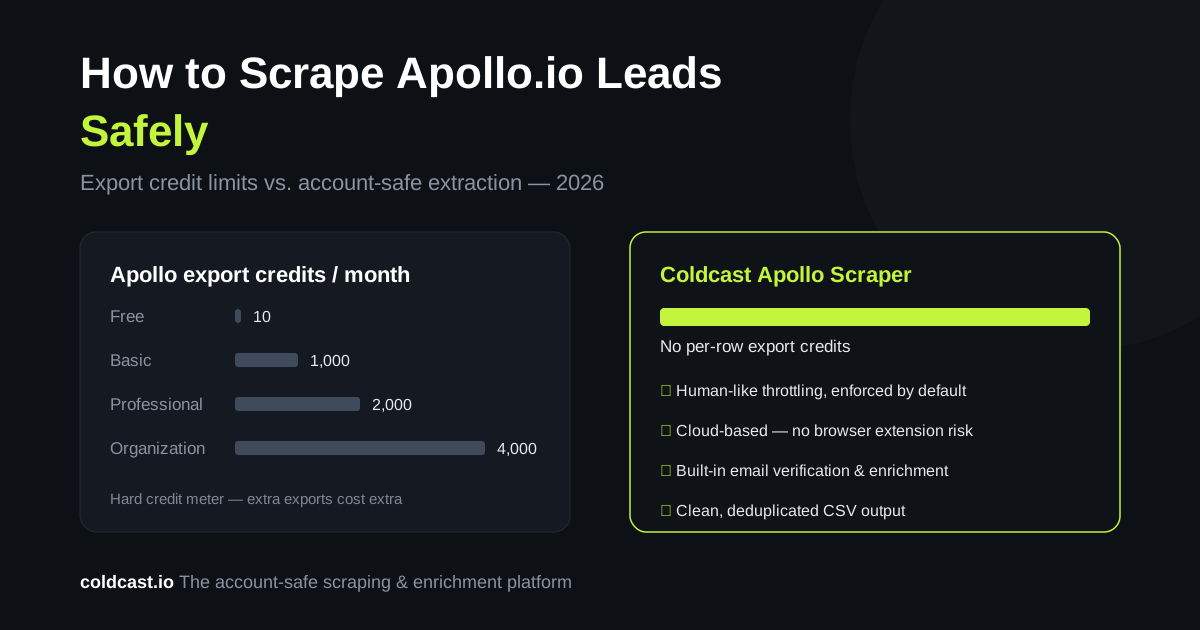
Apollo’s export credit limits (2026). Apollo meters exports with credits, and the allowances are tight relative to how most teams prospect:
- Free plan: 10 export credits per month — effectively, you can’t build a list at all.
- Basic ($59/mo, or $49/mo billed annually): 1,000 export credits per month.
- Professional ($99/mo, or $79/mo annually): 2,000 export credits per month.
- Organization ($149/mo, or $119/mo annually, 3-seat minimum): 4,000 export credits per month.
Pricing verified September 2026 — Apollo changes plan structures periodically, so check their pricing page for the latest. If your ICP search returns 20,000 matching contacts, even the Organization plan needs five months of credits — or costly add-on purchases — to export them. Buying extra credits works, but it turns Apollo from a fixed cost into a variable one that scales against you.
What a scraper changes. An Apollo scraper extracts the lead data you can already see in your search results — names, titles, companies, emails — directly into a CSV, without burning an export credit per row. You keep Apollo for search and filtering; the scraper handles the export.
The risks of scraping Apollo carelessly
Before you point any random Chrome extension at Apollo, understand the three ways this goes wrong.
1. Account flags and bans. Apollo actively monitors for automated behavior: page requests that come too fast, patterns no human produces, and headless browsers. Their terms of service prohibit automated extraction, and accounts that trip detection get rate-limited, flagged, or banned. Free and cheap scrapers that hammer Apollo’s servers at maximum speed are the most common cause.
2. Stale and unverified emails. Apollo’s database is broad, but no database stays fresh. A portion of any exported list will be outdated — people change jobs constantly. If you scrape 10,000 contacts and email them without verification, the bounce rate alone can get your sending domain blacklisted. A safe Apollo workflow always includes email verification after extraction and before sending.
3. Compliance blind spots. Scraped B2B contact data is generally workable for business outreach in most jurisdictions, but you still need to respect GDPR (lawful basis, easy opt-out for EU contacts), CAN-SPAM, and data minimization. Extract what you need for outreach — not everything you can grab.
How to scrape Apollo leads safely: the 5-step workflow
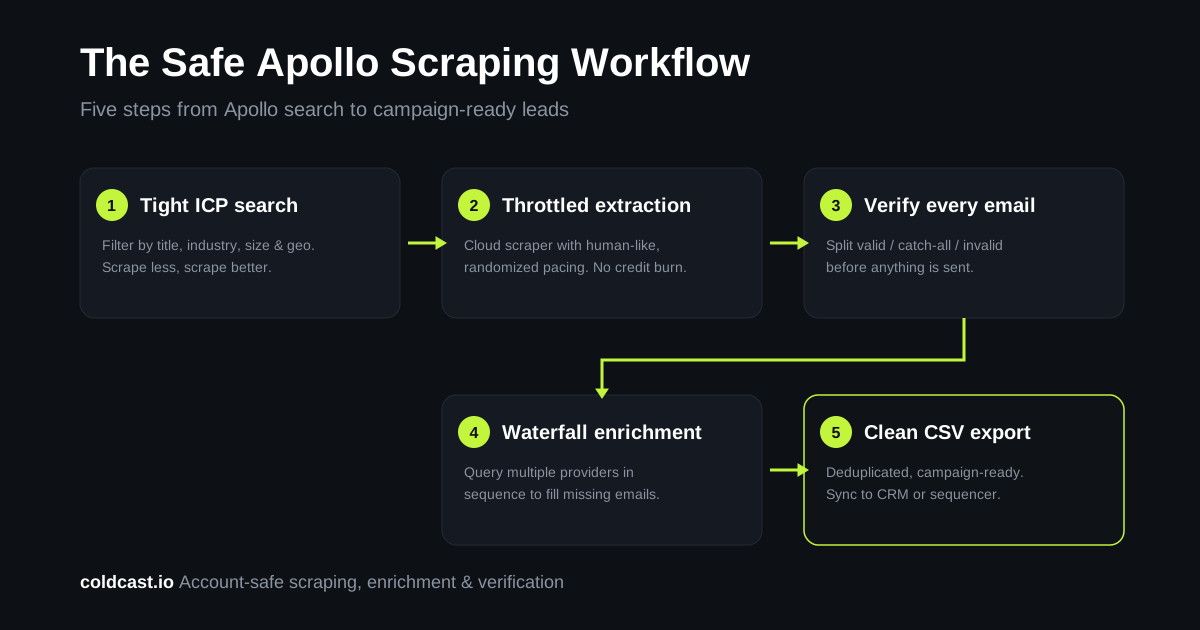
Step 1: Build a tight search in Apollo first. Scraping safety starts with scraping less. Use Apollo’s filters — title, seniority, industry, headcount, geography, technology — to get your search under a few thousand highly-qualified results instead of scraping six figures of “maybe” contacts. Smaller, precise extractions look more human, finish faster, and produce lists you’ll actually use.
Step 2: Use a scraper that throttles like a human. This is the single biggest safety factor. A safe Apollo scraper paces requests with human-like, randomized delays instead of blasting pages as fast as possible; respects session limits rather than running 24/7 on one account; and runs in the cloud, so you’re not keeping a browser tab hostage or running sketchy local scripts. Coldcast’s Apollo scraper was built around exactly this principle — the same account-safety-first architecture we use for our LinkedIn Sales Navigator scraper, where the cost of losing an account is even higher. Throttling is enforced by default; you can’t accidentally run it at a dangerous speed.
Step 3: Verify every email before it touches a campaign. Never send to a raw scraped list. Run extracted emails through verification to separate valid, catch-all, and invalid addresses. Coldcast includes email verification in the same pipeline, so leads come out campaign-ready instead of needing a second tool. Expect a meaningful share of any database export to fail verification — that’s normal, and it’s exactly why this step exists.
Step 4: Enrich the gaps with waterfall enrichment. Apollo won’t have a valid email for every contact that matches your ICP. Rather than discarding those leads, route them through waterfall enrichment — querying multiple data providers in sequence until one returns a verified email. This typically recovers a significant share of contacts that a single database misses, and you only pay for finds.
Step 5: Export clean CSVs and sync to your stack. The output should be a deduplicated, verified CSV that maps cleanly into your CRM or sequencer — with names properly cased, junk characters stripped, and personal emails separated from work emails. From there, push to Instantly, Smartlead, HubSpot, or wherever your outbound runs.
Apollo scraper options compared
Chrome extension scrapers. Cheap or free, but they run in your own browser session with your own fingerprint, usually with little or no throttling. Highest ban risk, and quality varies wildly. Fine for a one-off 50-lead test, risky for real volume.
DIY scripts (Python/Selenium). Full control, zero software cost — but you’re maintaining selectors, proxies, and delay logic yourself, and one mistake gets the account flagged. Only worth it if you’re technical and your time is free.
Cloud scrapers with built-in safety (Coldcast). Extraction runs server-side with enforced human-like pacing, then flows straight into verification and enrichment. This costs more than a free extension, but it’s the only approach designed around the assumption that your Apollo account — and your sender domain — are assets worth protecting.
We’re biased, but we’re also honest: if you only need a handful of leads occasionally, Apollo’s native export credits are fine and you don’t need a scraper at all. Scrapers earn their keep when your prospecting volume outgrows your credit allowance.
Apollo vs Sales Navigator scraping: which source is better?
Many teams use both. Apollo wins on breadth and filtering speed — it’s a database you can query instantly. Sales Navigator wins on freshness — LinkedIn data reflects job changes faster than any static database. A common Coldcast workflow is to build core lists from Sales Navigator, then use Apollo scraping to fill volume in segments where Sales Navigator coverage is thin. Either way, everything funnels through the same verification and enrichment pipeline. If you’re weighing the sources, our guide on exporting Sales Navigator leads to CSV covers the LinkedIn side.
Frequently asked questions
Is scraping Apollo.io legal?
Scraping publicly viewable B2B contact data is generally legal in most jurisdictions, but it does violate Apollo’s terms of service, which means the realistic risk is account suspension rather than legal action. Always verify and clean scraped data, and respect GDPR and CAN-SPAM in your outreach.
Will scraping get my Apollo account banned?
It can, if you scrape recklessly with high speed, no delays, and huge volumes on one account. Ban risk drops sharply with enforced human-like pacing, reasonable session volumes, and cloud-based extraction. Coldcast’s Apollo scraper enforces these safeguards by default.
How many leads can I extract from Apollo?
With native export credits: 10 per month on the free plan, 1,000 on Basic, 2,000 on Professional, and 4,000 on Organization (2026 limits). With a scraper, you’re limited by what your searches return and safe pacing rather than a credit meter.
Do scraped Apollo emails bounce?
Some will, because every database contains stale records. Run every scraped list through email verification before sending, and route unverified contacts through waterfall enrichment to find current addresses.
What’s the safest way to scrape Apollo leads?
Use tight, filtered searches; a cloud scraper with enforced human-like throttling; email verification on every extracted contact; and waterfall enrichment for the gaps. Coldcast runs this exact pipeline end-to-end.