The Evaboot Alternative Built for Account Safety
Evaboot made Sales Navigator exports simple. But if credits stack up, single-source email finding misses too many contacts, or account safety keeps you up at night — here is the honest comparison.
Why people look for an Evaboot alternative
Evaboot is a solid, well-known Chrome extension, and for basic exports it does the job. From public reviews and our own testing, the reasons users switch tend to fall into four buckets.
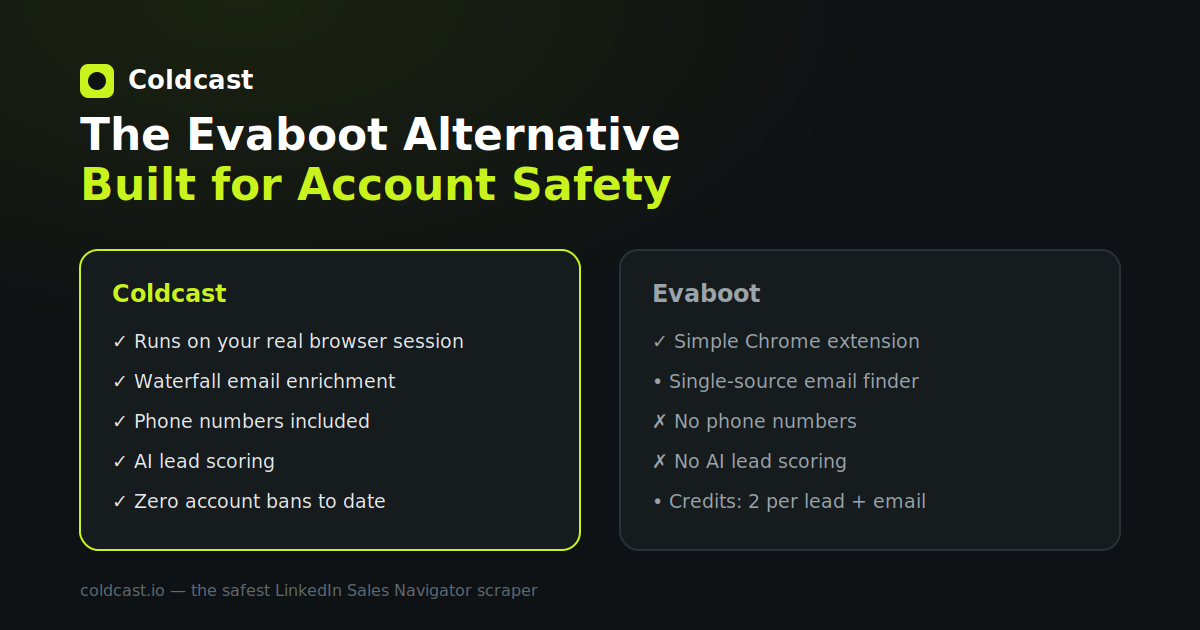
1. Credit costs stack up fast. Evaboot's pricing starts at $9/month for 100 credits. One credit gets you one exported lead — but a lead *with* a found and verified email costs two credits. A 2,000-lead list with emails means 4,000 credits a month, several tiers up the pricing ladder. If you run continuous outbound, the effective cost per enriched lead matters more than the entry price.
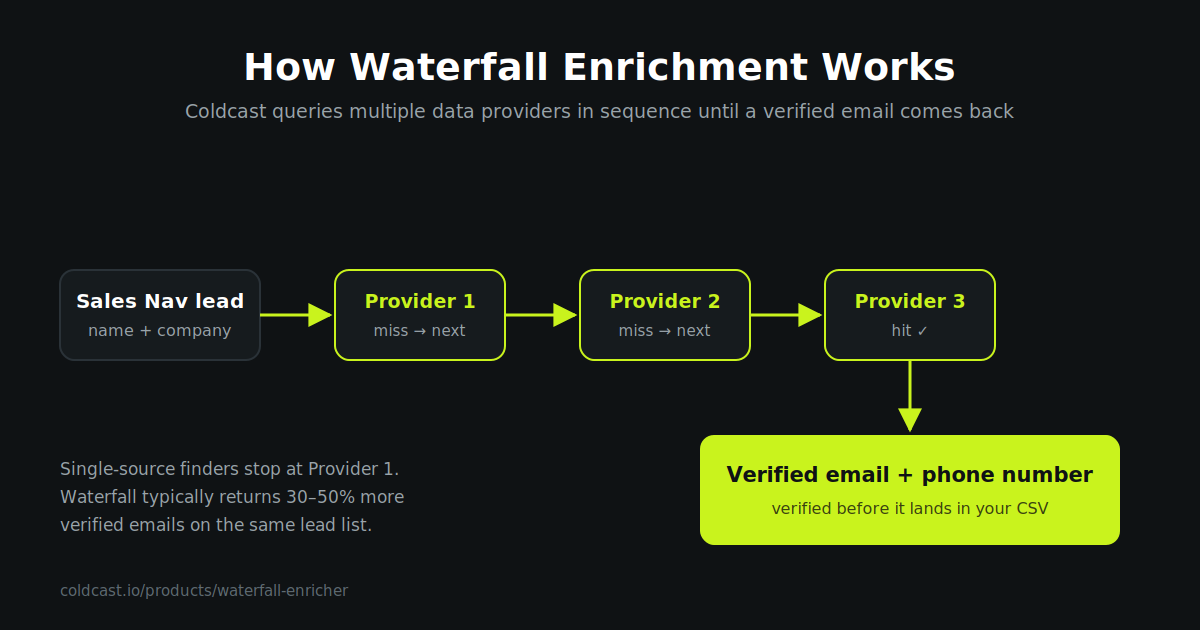
2. Single-source email finding. Evaboot finds emails with its own built-in finder. That is fine when it hits, but no single provider covers every industry, geography and seniority level. Waterfall enrichment — querying multiple data providers in sequence until one returns a valid email — typically produces 30–50% more verified emails on the same list. Evaboot does not offer it; Coldcast runs it on every export by default.
3. No phone numbers. Evaboot's plans cover export, email finding and verification. If your sequences include cold calling, you need a second tool for numbers. Coldcast's waterfall adds direct dials during the same export pass.
4. Safety is a spectrum, not a checkbox. Every scraper claims to be safe — the mechanics matter. Coldcast runs your own logged-in session in a secure, isolated cloud browser, at human speed with hard limits. To LinkedIn, your activity looks like you — because it is you. That architecture is why Coldcast maintains a record of zero account bans, as we explain in our account-safety guide.
Coldcast vs Evaboot at a glance
| Coldcast | Evaboot | |
|---|---|---|
| How it runs | Your own logged-in session, human-paced with hard limits | Chrome extension, own infrastructure |
| Ban-risk architecture | Human-paced, real session — zero bans to date | Generally regarded as safe |
| Email finding | Waterfall across multiple providers | Single built-in finder |
| Email verification | Included on every found email | Included (0.5 credit per verification) |
| Phone numbers | Included via waterfall enrichment | Not offered |
| AI lead scoring | Yes — buying signals + fit scoring | No |
| Company-level searches | Yes | Yes |
| Speed | Up to 10,000 leads/hour, 20,000/day | Export-dependent |
| Entry pricing | Free trial, then pay-as-you-go credits | From $9/mo for 100 credits |
| Seats | Multi-account support on agency plans | Unlimited seats on all plans |
*Evaboot details verified against evaboot.com's live pricing page in July 2026. If anything has changed, tell us and we'll correct it.*
What makes Coldcast different
Account safety as the core design decision. Coldcast was built backwards from one constraint: your LinkedIn account must survive. A banned account costs you your network, your Sales Navigator subscription, and often your sending domain's warm-up work — far more than any scraper subscription. Everything else is designed within that constraint: human-paced extraction on your own logged-in session, conservative hard limits, no stored passwords.
Waterfall enrichment built in — not bolted on. Most Evaboot workflows look like: export → upload the misses to a second email finder → upload to a verifier → merge spreadsheets. Coldcast collapses that into one pass — each lead runs through multiple providers until a verified address comes back, then through real-time verification, then phone lookup. One file, ready for your sequencer.
AI lead scoring on every export. Coldcast scores each lead and surfaces buying signals you can drop straight into a first line. Instead of 2,000 undifferentiated rows, you get a ranked list — start where conversion is most likely.
Five-minute setup. Connect your LinkedIn account (Coldcast never stores your password), paste your Sales Navigator search URL, and start the export. No proxies, no cookies to paste.
Who should stay on Evaboot?
Honesty cuts both ways. Evaboot is a reasonable fit if you export small lists occasionally, don't need phone numbers, and its single email finder covers your market well — its data cleaning is genuinely good, and unlimited seats at every tier is generous for teams that export rarely but broadly. If that's you, you may not need to switch. If you run outbound every week and your email hit rate or account safety keeps you up at night, that's the gap Coldcast was built to close.
Switching from Evaboot to Coldcast
- Connect your LinkedIn account and sign in — your Sales Navigator subscription works as-is.
- Re-run your saved Sales Navigator searches. Paste each search URL into Coldcast; there is nothing to migrate.
- Compare the output. Run the same list you last exported from Evaboot and compare verified-email coverage — the free trial exists precisely for this test.
- Point the CSV at your existing stack. Coldcast exports CSV/XLSX that drops into Clay, HubSpot, Salesforce, or any sequencer.
Also scraping other databases? Coldcast covers Apollo and ZoomInfo exports with the same enrichment pipeline.
Frequently asked questions
Is Coldcast really safer than Evaboot?
Both tools are safer than machine-speed, credential-storing bots. The difference is architectural: Coldcast drives your own logged-in session at human speed with hard limits, so there is no separate login, no stored password, and no generic automation fingerprint for LinkedIn to detect. Coldcast has recorded zero account bans.
Does Coldcast find more emails than Evaboot?
Typically yes, because Coldcast uses waterfall enrichment — querying multiple email providers in sequence — while Evaboot uses a single built-in finder. Waterfall approaches usually return 30–50% more verified emails on the same list. Run your last Evaboot export through Coldcast's free trial and compare.
Can I get phone numbers with Coldcast?
Yes. Coldcast's waterfall enrichment adds phone numbers alongside verified emails during the same export. Evaboot does not currently offer phone number enrichment.
Do I need my own proxies or any technical setup?
No. Coldcast runs your own logged-in session in a secure cloud browser — no local software to babysit. Setup takes about five minutes and requires no proxies, no cookies to paste, and no technical configuration. Your LinkedIn password is never stored.
How fast can Coldcast export Sales Navigator leads?
Up to 10,000 leads per hour and 20,000 per day, while still pacing each action like a human session. Speed limits exist to protect your account.
Does Coldcast work with company (account) searches?
Yes. Coldcast supports both people searches and company-level Sales Navigator searches, so you can export account lists as well as lead lists.