Coldcast vs Evaboot: Which Sales Navigator Scraper Should You Trust in 2026?
Coldcast and Evaboot both turn Sales Navigator searches into clean lead lists, but they take different approaches to account safety, enrichment depth and what happens to your data after export. Here is the head-to-head.
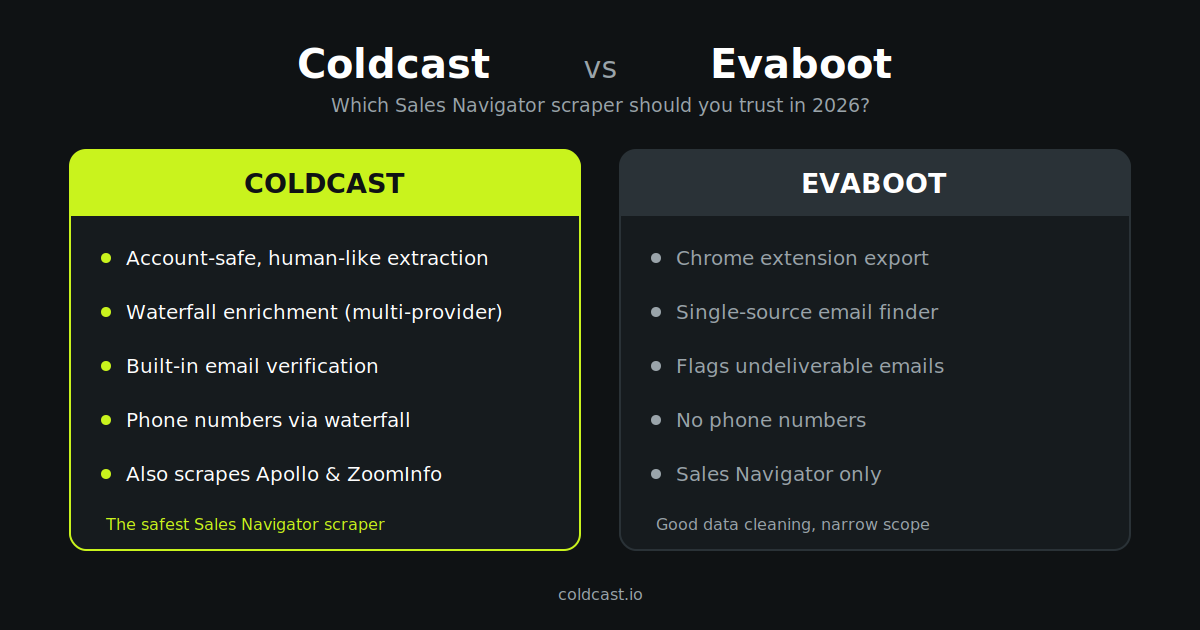
The short answer
Evaboot is a well-known Chrome extension that exports and cleans Sales Navigator searches and finds work emails from a single source. It’s simple and affordable to start with.
Coldcast is built around a different premise: scraping should be account-safe first, and a single email source is never enough. Coldcast pairs human-like, rate-controlled extraction with waterfall enrichment across multiple data providers and built-in email verification — so you get more valid emails per 1,000 leads, with less risk to the LinkedIn account doing the exporting.
If you export a few hundred leads occasionally and only need emails, Evaboot will do the job. If outbound is your pipeline engine and a restricted LinkedIn account or a burned sending domain is unacceptable, Coldcast is the safer, more complete system.
Coldcast vs Evaboot at a glance
| Coldcast | Evaboot | |
|---|---|---|
| Core job | Account-safe scraping + enrichment + verification | Sales Nav export + data cleaning + email finding |
| Account safety | Human-like pacing, rate limits tuned to stay under LinkedIn’s radar | Chrome-extension export; safety depends on your own volume discipline |
| Email finding | Waterfall across multiple providers | Single-source email finder |
| Email verification | Built in, applied before you download | Flags undeliverable addresses |
| Phone numbers | Available via waterfall enrichment | Not offered |
| Beyond Sales Navigator | Apollo & ZoomInfo scraping, domain enrichment | Sales Navigator only |
| Automation | Coldcast Agent for hands-off list building | Manual, search-by-search exports |
| Entry price | Free trial, then usage-based | From ~$9/mo (credit-based) |
Where Evaboot is genuinely good
Data cleaning. Sales Navigator results are notoriously noisy — Evaboot’s filtering removes a large share of results that don’t actually match your criteria, and independent reviews consistently praise this.
Simplicity. It’s a Chrome extension: install, run a search, click export. There’s very little to learn.
Low entry price. Paid plans start around $9/month on a credit model, easy to justify for light usage.
Where the two tools diverge
1. Account safety is a feature, not a footnote. Every Sales Navigator scraper operates in territory LinkedIn actively polices — request velocity, viewing patterns and volume anomalies — and the penalty for tripping it lands on your account, not your vendor’s. Coldcast’s Sales Navigator scraper mimics human browsing, throttles against LinkedIn’s practical limits, and keeps your account’s behaviour inside normal bounds. That’s why Coldcast positions itself as the safest Sales Navigator scraper — safety is the architecture, not a setting.
2. One email source vs a waterfall. Third-party testing has reported Evaboot find rates in the 55–65% range, lower for SMB contacts. Coldcast runs waterfall enrichment: each lead is checked against multiple providers in sequence until a valid, verified email (and optionally a phone) is found. If one provider finds 60%, cascading three or four pushes coverage meaningfully higher on the same list.
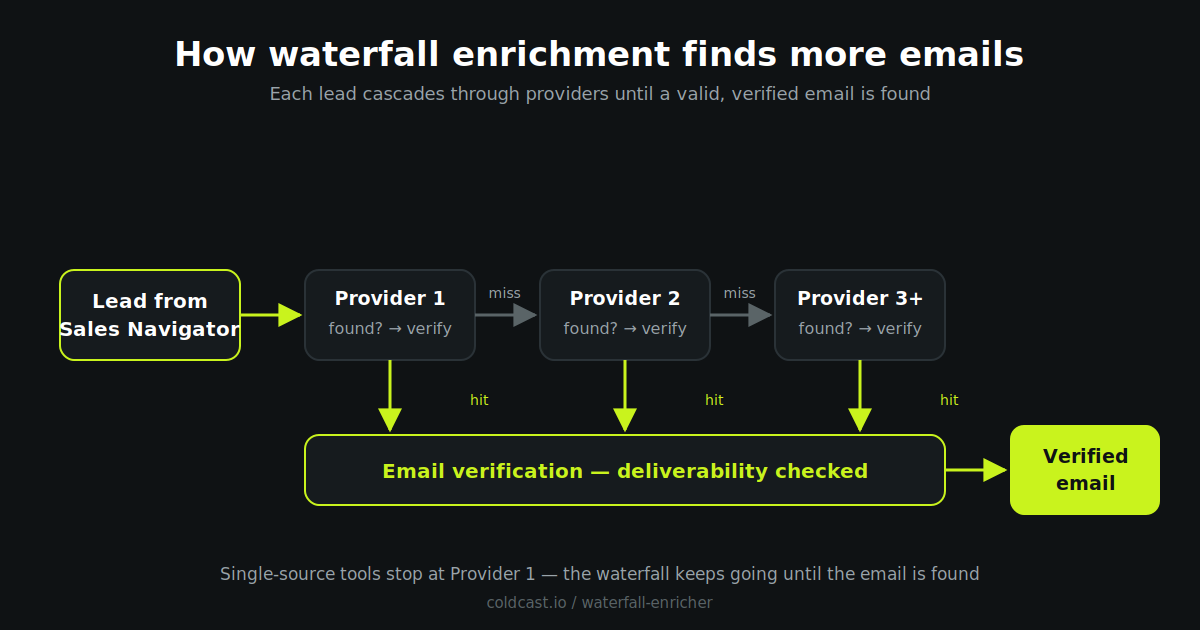
3. Verification before your CRM ever sees the list. A lead list is only as good as its bounce rate. Coldcast applies email verification as part of the pipeline, so what you download is already deliverability-checked — protecting the sending domains your outbound depends on. Evaboot flags undeliverables it detects, but a single-pass check on a single source leaves more risk in the list.
4. Phones, other databases and automation. Evaboot is deliberately narrow: Sales Navigator in, emails out. Coldcast also scrapes Apollo and ZoomInfo, enriches from a domain list, and runs recurring, hands-off builds through the Coldcast Agent. If your prospecting spans more than one database, that consolidation replaces two or three subscriptions.
Pricing: read the fine print on credits
Both tools are credit-based and both require your own Sales Navigator subscription (roughly $100/month from LinkedIn), so the real cost of either stack starts there.
Evaboot’s entry price is low, but note two things: a lead with a found and verified email consumes more than one credit, and a lower find rate means paying to export leads you can’t actually email. At higher volumes, per-lead economics matter more than the headline price. For a fair comparison, price both tools per valid, verified email delivered on the same 1,000-lead list — that’s the number that predicts pipeline.
Which should you choose?
Choose Evaboot if you export occasionally, your targets are mostly enterprise contacts (where single-source find rates are strongest), you don’t need phone numbers, and you’re comfortable managing your own export volumes.
Choose Coldcast if outbound is a core channel and you can’t risk your LinkedIn account; you want the highest email coverage per list via waterfall enrichment; you need verified emails (and phones) in your CRM without a second tool; or you prospect beyond Sales Navigator. See how teams in different roles use Coldcast, or read our guide to Evaboot alternatives.
Frequently asked questions
Is Coldcast safer than Evaboot for my LinkedIn account?
Coldcast is built account-safety-first: it paces extraction to mimic human browsing and enforces limits designed to keep your account under LinkedIn’s detection thresholds. Evaboot can be used safely at modest volumes, but managing risk is largely up to the user.
Does Evaboot find phone numbers?
No. Evaboot returns work emails only. Coldcast can return phone numbers through its waterfall enrichment step.
Do I need LinkedIn Sales Navigator for both tools?
Yes. Both Coldcast and Evaboot export data from Sales Navigator searches, so an active Sales Navigator subscription is required either way.
What is waterfall enrichment and why does it beat a single email finder?
Waterfall enrichment checks each lead against multiple data providers in sequence until a valid email is found, instead of relying on one source. Because providers have different coverage, cascading them raises the share of leads you can actually contact — typically well above single-source find rates.
Can I switch from Evaboot to Coldcast easily?
Yes. Both tools work on top of your existing Sales Navigator searches, so there’s no data migration — point Coldcast at the same saved searches and re-enrich past exports to recover emails Evaboot couldn’t find.